
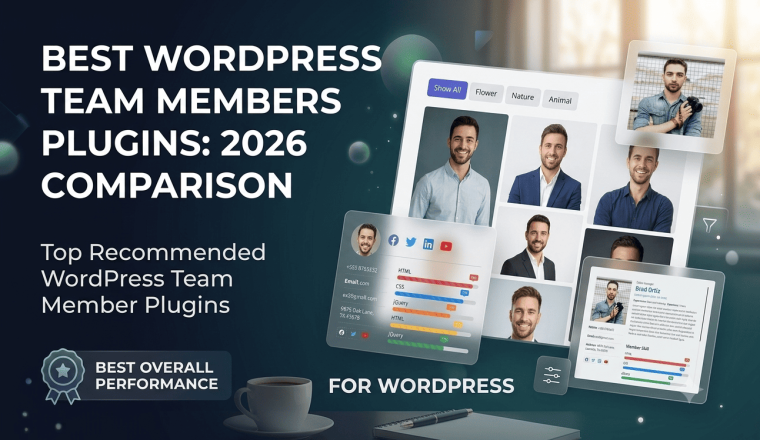
7 Best WordPress Team Members Plugins to Boost Trust and Conversions

People buy from people. In a digital landscape filled with anonymous storefronts and faceless corporations, human connection remains the ultimate conversion driver. When a prospective client lands on your website, they are looking for reasons to trust you. They want to know who is behind the curtain, who handles their account, and who builds the products they rely on daily.
This is exactly why your “Our Team” or “About Us” page is consistently one of the most visited pages on any corporate website. A generic text list of names or an unorganized grid of poorly cropped headshots will actively drive potential business away.
To convert cold traffic into loyal clients, your team showcase needs to be visually stunning, perfectly responsive, and deeply informative. Displaying your staff with modern social media integration, clear department filters, and crisp interactive layouts instantly elevates your brand value. It transforms a sterile website into a living, breathing organization built on transparency.
The Custom Code Trap vs. Maintained WordPress Plugins
When looking to display team members in WordPress, developers and site owners often fall into a common trap: writing custom HTML and CSS or using AI generators to spin up a quick layout. While a custom-coded solution might look acceptable on day one, it introduces immediate long-term headaches.
Theme Integration Friction
Custom code is rarely truly modular. The moment you switch your WordPress theme or update your core site builder, your custom-coded team section will likely break. Container widths shift, font pairings clash, and margins collapse, leaving you with a broken page layout.
Responsiveness Faults
Designing a responsive team grid that looks flawless on a desktop monitor, an iPad Pro, and an iPhone 13 requires complex media queries. Custom-coded snippets often fail on obscure screen resolutions, causing your team photos to overlap or stretch awkwardly.
Maintenance Nightmares for Non-Coders
If your company hires a new executive or a staff member changes their LinkedIn URL, a custom-coded layout forces you back into the source files. Non-technical marketing managers or site editors cannot safely edit raw HTML snippets without the risk of breaking the entire page structure.
Security Vulnerabilities
Uncached, poorly optimized custom scripts can open up minor security loopholes or add bloat to your site footprint.
A professionally maintained, dedicated WordPress team showcase plugin bypasses all of these risks. It offers a standardized interface that isolates your data from your theme style. This guarantees that your team page remains secure, lightning-fast, and easy to update without touching a single line of code.
Quick Comparison Table
| Plugin Name | Best For | Key Highlight | Price (Free / Pro) |
| RWC Team Members Pro | Editor’s Choice / Best Overall | 4 Core Layouts (Grid, Slider, Popup, Expand) & Video Profiles | Free / $19 |
| AWSM Team | Minimalist Workspaces | Unique drawer layouts and clean aesthetic card skins | Free / $29 |
| Team by RadiusTheme | Corporate Multi-Department Sites | Robust category mapping and simple clean shortcodes | Free / $31 |
| WP Team by HT Plugins | Elementor Power Users | Deep add-on integration with Elementor modules | Free / $19 |
| Team Members by WP Darko | Basic Simplistic Setups | Straightforward profile creation via a single admin dashboard | Free / $19 |
| WP Team Manager | Classic Grid Showcases | Clean table views and simple native styling adjustments | Free / $48 |
| Smart Team | Dynamic Touch Sliders | Great touch-swipe responsive navigation settings | Free / $49 |
Top Recommended WordPress Team Member Plugins
1: RWC Team Members Pro (Editor’s Choice / Best Overall)
RWC Team Members Pro is a standout choice for displaying team members in WordPress. It balances rich customization with lightweight performance, making it perfect for freelance web developers and enterprise marketing agencies alike. The plugin is built from the ground up to eliminate the need for custom CSS tweaks, allowing you to create beautiful team layouts in minutes.
Standout Features
-
Four Versatile Layout Types: Switch instantly between standard Grid views, smooth touch Carousel Sliders, interactive Modal Popups, and dynamic Accordion Expand systems.
-
Department Filtering: Built-in live filtering lets users instantly sort staff members by their respective departments without a page reload.
-
YouTube Video Integration: Instead of just standard static photos, you can embed direct video introductions inside team lightboxes.
-
Modern Skill Progress Bars: Display professional expertise dynamically with customizable percentage skill bars.
-
Image Hover Effects: Includes premium hover animations that display social links or alternative headshots cleanly.
Free vs. Pro Pricing
-
Free Version: Includes standard grid options, basic social icons, and default column configurations.
-
Pro Version ($19): Unlocks all 25+ premium ready-made templates, the complete set of 4 layout modes, video integration, live category filtering, and lifetime premium support.
Pros & Cons
-
Pros: Lightweight code footprints that keep pages fast, beautiful responsive mobile rendering, and a zero-coding interface.
-
Cons: The sheer number of design configurations might take a few minutes to explore fully.
2: AWSM Team
AWSM Team is a highly professional team showcase plugin known for its clean typography and creative design options. It is widely used for modern corporate environments that want to move away from boring, static image grids.
Standout Features
-
Drawer Style Layout: Clicking a team member opens a clean side or bottom sliding drawer with full biography details.
-
Preset Visual Skins: Comes with distinct styling cards including Card, List, Table, and Slide presets.
-
Clean Deep Customization: Gives you full control over text size, alignment, and background padding right out of the box.
Free vs. Pro Pricing
-
Free Version: Basic card presets with standard social link inputs.
-
Pro Version ($29): Adds deep layout control, drawing animations, full typography settings, and support for additional custom fields.
Pros & Cons
-
Pros: The sliding drawer layout provides a sleek user experience that keeps users on the same page.
-
Cons: Custom styling adjustments can be slightly restrictive if your theme has aggressive global styles.
3: Team by RadiusTheme
RadiusTheme is well-known for producing highly stable WordPress utility add-ons, and their Team plugin matches that reputation. It focuses heavily on structured information hierarchy, making it ideal for massive organizations with hundreds of employees.
Standout Features
-
Multi-Department Mapping: Assign a single employee to multiple corporate designations or office locations with ease.
-
Shortcode Generator Matrix: A highly detailed shortcode creator interface inside your WordPress dashboard.
-
Pagination Control Options: Built-in navigation options to manage high-volume employee directories without performance dips.
Free vs. Pro Pricing
-
Free Version: Limitless employee directory inputs with standard grid templates.
-
Pro Version ($31): Unlocks isotope filtering tabs, carousel layouts, detail page links, and additional layout choices.
Pros & Cons
-
Pros: Excellent architectural stability for websites containing very large rosters.
-
Cons: The default styling templates look a bit traditional out of the box and might require customization to feel modern.
4: WP Team by HT Plugins
WP Team is a versatile entry built with deep integrations for modern page builder ecosystems. If you build websites using Elementor, Divi, or Beaver Builder, this plugin slides into your workflow seamlessly.
Standout Features
-
Elementor Extensions: Provides dedicated custom widgets inside the Elementor editing panel for fast dragging and dropping.
-
Image Shape Settings: Toggle team avatars between sharp squares, soft rounded corners, or perfect circles without pre-cropping.
-
Custom Detail Pages: Create an automatic standalone sub-page for every employee profile box.
Free vs. Pro Pricing
-
Free Version: Simple grid blocks and basic shortcode creation toolsets.
-
Pro Version ($19): Complete slider configurations, elementor templates, popups, and comprehensive overlay animation style choices.
Pros & Cons
-
Pros: High flexibility for page builder users who want to match design aesthetics quickly.
-
Cons: Code optimization is slightly heavier compared to ultra-light alternatives due to its builder dependencies.
5: Team Members by WP Darko
If your goal is absolute simplicity without complex layout parameters, Team Members by WP Darko is a great fit. It is designed to get a neat row of staff profiles onto your website as quickly as possible.
Standout Features
-
Single-Screen Admin Interface: Add staff names, bios, positions, and photos all from a unified dashboard menu screen.
-
Color Matching Slider Tool: A simple master color picker option that changes the highlight scheme of your grid instantly.
-
Clean Typography Blocks: Clean font styling defaults that inherit your current theme options directly.
Free vs. Pro Pricing
-
Free Version: Allows up to 4 team members per shortcode group with basic layouts.
-
Pro Version ($19): Removes the profile volume cap, unlocks secondary photo hover options, and adds multi-column choices.
Pros & Cons
-
Pros: Extremely easy to set up for small business sites that need an instant solution.
-
Cons: Lacks advanced display systems like popups, carousel sliders, or search filter tabs.
6: WP Team Manager
WP Team Manager is a practical choice for developers looking for clean, structured employee tables and grid lists. It avoids over-the-top animations in favor of stability and fast rendering speeds.
Standout Features
-
Roster Table Design Presets: A clean table layout option that works perfectly for university faculties or medical directory logs.
-
Order Sorting Controls: Easily drag and drop employee rows inside the backend dashboard to rearrange site display rankings.
-
Custom Profile Tags: Add fast designation tags to quickly highlight special roles.
Free vs. Pro Pricing
-
Free Version: Standard grid blocks and list outputs.
-
Pro Version ($48): Extends sorting capabilities, enables shortcode filters, and includes responsive slider adjustments.
Pros & Cons
-
Pros: The roster list style is great for sites requiring scannable contact details over heavy imagery.
-
Cons: The visual interface feels slightly dated compared to modern block-style layout dashboards.
7: Smart Team
Smart Team is built specifically around visual fluidity. If you want your team profiles to animate smoothly when pages load or filters are clicked, this option delivers great results.
Standout Features
-
Touch Swipe Carousel Engine: Highly optimized mobile touch navigation settings for fluid swiping on smartphones.
-
Auto-Play Timers: Adjust carousel rotation speeds and pausing loops directly from your settings panel.
-
Frosted Glass Overlays: Modern glassmorphism options for text descriptions overlaying your team images.
Free vs. Pro Pricing
-
Free Version: Basic touch carousel engine with standard styling fields.
-
Pro Version ($49): 8+ complex layout paths, multi-layered animations, custom filter nodes, and advanced typography controls.
Pros & Cons
-
Pros: Outstanding out-of-the-box performance for mobile phone browsers.
-
Cons: Can create visual clutter if too many exit or entry animations are activated at the same time.
Key Factors to Consider When Choosing a Team Plugin
Selecting the right tool requires analyzing a few essential technical performance benchmarks.
Responsiveness and Mobile Performance
Your site visitors are using a wide range of devices. Inspect how a plugin handles column scaling on mobile displays. A quality responsive team plugin for WordPress should automatically compress a 4-column desktop grid into a neat 2-column layout on tablets and a single-column layout on smartphones. It should also support touch-friendly navigation for any slider options.
Page Speed and Lightweight Architecture
Every script you add to your site can slow down load times. Avoid plugins that load massive external icon libraries or unnecessary script bundles on every page. Look for lightweight plugins that only load their CSS and JavaScript when a team shortcode is present on the page.
Design and Customization Flexibility
A good plugin should adapt to your existing site design rather than forcing a preset look on you. Choose options that let you control image shapes, hover animations, social icon placements, and layout choices directly from the dashboard.
Regular Security Updates and Support
WordPress updates its core software frequently. Using an abandoned or outdated plugin leaves your website vulnerable to compatibility bugs and security exploits. Check the developer’s update history to ensure they regularly test their software against the latest WordPress core releases.
Image & Performance Optimization Tips
A team page packed with unoptimized high-resolution images can quickly ruin your website’s performance. Follow these optimization steps to keep your team page fast and user-friendly.
Switch to WebP Format
Never upload raw JPEGs or massive PNGs straight from a professional camera onto your WordPress site. Convert your team headshots into WebP format before uploading. WebP reduces file sizes by up to 30% compared to JPEGs without losing image quality, keeping your pages lightweight.
Enforce Consistent Image Proportions
Cropping all team headshots to the exact same aspect ratio (like a clean 1:1 square or a structured 4:3 portrait ratio) before uploading ensures a professional look. This simple step prevents your grid rows from breaking or looking unaligned due to mismatched photo heights.
Leverage Smart Lazy Loading
Ensure that your team showcase plugin works harmoniously with lazy loading scripts. By enabling lazy loading, images below the fold will wait to load until the user scrolls down the page. This significantly improves your site’s initial load time and boosts your Core Web Vitals score.
Manage Biography Lengths
Keep your short bio descriptions concise. If a staff member wants to share an extensive professional history, use a layout style like an interactive popup window or an expandable accordion box. This approach gives users access to deep background details without cluttering your main grid layout.
Frequently Asked Questions (FAQ)
Will using a team member plugin slow down my WordPress site?
Not if you select a well-built, lightweight plugin. High-quality team plugins use minimal scripts and only load assets when a shortcode is present on the page. To ensure fast load times, always optimize your uploaded profile images and use modern file formats like WebP.
Can I display multiple independent team blocks on different site pages?
Yes. Plugins like RWC Team Members Pro assign a unique shortcode ID to every team collection you build. This allows you to display a department grid on your main About page while placing an executive board slider on a completely different page.
How do I handle team member changes if I change my global WordPress theme?
Professional team showcase plugins save employee profiles independently within the WordPress database. This isolation means you can change your global theme as often as you want without losing any employee bios, profile links, or photo assignments.
What is the difference between custom code and a dedicated team plugin?
Custom code requires manual updates inside theme files every time a staff member changes or a social link needs updating. A dedicated team plugin provides a secure, user-friendly interface that lets any non-coder add or edit staff members instantly without risking layout breaks.
Conclusion & Final Verdict
Building an exceptional “Our Team” showcase is a smart investment in your website’s user experience and brand credibility. While there are many options available in the WordPress plugin ecosystem, finding the perfect balance between styling flexibility and fast performance is key.
If you are looking for an all-in-one solution that delivers premium design options without slowing down your site, RWC Team Members Pro stands out as the best overall choice. Its combination of four distinct layout paths, AJAX-powered filtering options, and unique video integration settings gives you everything needed to build beautiful team directories.
For simple sites that just need a quick row of profiles, a basic option like Team Members by WP Darko works perfectly. If you are deeply integrated into page builders, a tool like WP Team by HT Plugins is a reliable choice.
Take the time to evaluate your specific gallery requirements, optimize your profile headshots, and pick a well-maintained plugin that brings your website to life.




There are no comments yet for this post