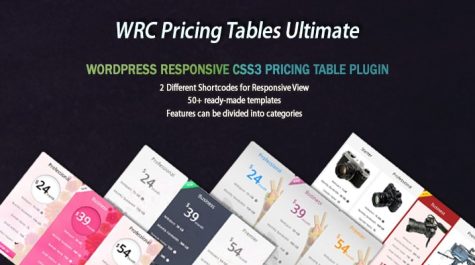
The WRC Pricing Tables Ultimate is a WordPress plugin that enables users to create professional-looking pricing tables for their website. The plugin is fully responsive and is built using CSS3, making it easy for users to manage and customize their pricing tables without requiring any coding knowledge. This pricing table plugin is the ultimate version of WRC Pricing Tables.
The WRC Pricing Tables Ultimate plugin is an affordable and easy-to-use tool that can help you create professional-looking pricing tables for your website. With this plugin, you can improve your website’s user experience and increase your sales by making it easier for customers to compare your pricing plans.
Watch the Demo Video
Before you dive into the WRC Pricing Tables Ultimate plugin details, watch our quick YouTube video for a clear overview of its features and how it can boost your pricing tables. It’s the fastest way to understand how the plugin works and start using it effectively.
All our templates are built with clean CSS3 without any JavaScript! We designed them to deliver the best viewing experience on all devices. You can add or change any color you like, even for each single row of a column!
Take your pricing tables to the next level with the ultimate version of our plugin! Packed with advanced features and easy-to-use tools, it allows you to create stunning, professional pricing tables that elevate your business and drive more sales. Here’s what you can do:
Key Features:
WRC Pricing Tables
- Update Features and Columns: After activating the Pro version, please update the features and columns once by going to the Edit Features and Edit Columns sections. This ensures that your pricing table functions as intended with the new features.
- Review Style Changes: Note that some style elements, such as background colors in feature areas and rounded corners, might differ between the free and Pro versions. You can easily adjust these settings by editing the plugin’s configuration.
One of the key features of the WRC Pricing Tables Ultimate is the ability to categorize pricing features. This feature enables users to organize their pricing plans and packages into different categories, making it easier for customers to compare and choose the plan that suits their needs.
Enhance the visual appeal of your pricing tables with versatile image options. Images can be used in the price section, either alongside the price or as a standalone feature, adding a unique touch to your design. Additionally, you can set images as background visuals for individual columns, creating a dynamic and branded look for your tables.
Showcase your pricing tables in two versatile layouts to suit your needs:
- Standard Layout: This is the usual format where pricing table columns are displayed side by side, each representing a different package or option.
- Comparison Layout: This layout includes a dedicated comparison column on the left, which lists all the feature names. The remaining columns display the corresponding feature values for each package, making it easier for users to compare offerings at a glance.
This dual-display functionality enhances flexibility, allowing you to present pricing information in a way that best suits your audience’s needs. Also, ensures a clearer, more engaging presentation for your audience.
Take full control of your pricing table design with the built-in Custom CSS Editor. This feature allows you to add personalized CSS styling to match your website’s unique branding and achieve a truly customized look.
Optimize your website’s performance by minifying the CSS and JS files of your pricing tables. This feature reduces file size, enhances page load speed, and ensures your tables remain visually appealing and fully functional.
Why Minify CSS & JS Files?
What developers do
During development, developers include comments, spacing, and descriptive variable names in CSS and JS files to improve code readability. However, these elements add unnecessary weight, increasing network traffic without providing any functional benefits when serving web pages.
How Minify CSS & JS helps
- Minification removes these extras
- Compressing the file by eliminating comments, spaces, and unnecessary code
- Optimizing variable names to reduce file size
Result of Minification
- Smaller file size that retains full functionality
- Improved load times
- Reduced bandwidth usage, providing a faster, more efficient user experience
Premium Features of WRC Pricing Tables Ultimate
The WRC Pricing Tables Ultimate offers a variety of premium features designed to enhance the functionality and customization of your pricing table showcases.

Responsive Design
The plugin ensures compatibility with all devices, delivering flawless display across screens. Whether it’s mobile, tablet, or desktop, your pricing tables will look perfect.

Built-in Templates
Choose from 60+ pre-designed templates to create stunning pricing tables instantly. These templates are crafted for various use cases, saving you valuable time.

Template Switching
Easily switch between templates without losing your content or formatting. This feature gives you the flexibility to experiment with different styles effortlessly.

Duplicate Tables
Save time by duplicating existing tables instead of building from scratch. It’s perfect for creating multiple similar tables with minor tweaks.

Import & Export
Quickly transfer pricing tables between websites with the import/export feature. This ensures seamless backup and restoration across projects.

Unlimited Columns
Add as many rows and columns as needed, with no restrictions. You can also customize the colors for better alignment with your brand.

Simple Animations
Add dynamic effects like enlarging columns upon hovering or disabling shadows. Enhance interactivity to captivate your audience.

Hyperlink Features
Assign hyperlinks next to feature names for added interactivity. You can even customize the link colors to match your design.

Hide Features
Easily hide feature names or empty rows for a cleaner, clutter-free table. This helps you focus on displaying relevant information only.

Hide Columns
Hide one or multiple columns temporarily without deleting them. This makes it easier to manage and reuse your pricing tables as needed.

Customizable Layout
Hide any part of the table to customize its layout based on your requirements. This feature allows greater control over the table’s appearance.

Feature Tooltips
Add helpful tooltips to explain features in detail for better user clarity. Customize tooltip color and width to fit your design needs.

Ribbons for Columns
Highlight specific columns with attractive ribbons in unlimited colors. Use this to draw attention to recommended or featured packages.

Icon Options
Choose from 20 tick and cross icons or use Font Awesome icons. Customize features with icons that enhance clarity and style.

Price & Feature Alignment
Align price units and feature names to the left or right as per your design preference. This ensures a balanced and professional look.

Price/Button Positioning
Place the price section or buttons at the top or bottom as needed. This flexibility ensures a user-friendly and custom table design.

Sortable Content
Reorder columns and features with simple drag-and-drop functionality. This makes organizing and updating tables quick and easy.

Typography Options
Use Google Fonts and Font Awesome icons to enhance the visual appeal of your tables. These tools help maintain consistency with your site’s design.

PayPal Integration
Easily integrate PayPal buttons into your pricing table. Enable direct purchases for your customers with this feature.

Package Media Support
Add images and YouTube videos to your pricing tables to make them more dynamic and engaging. Ideal for showcasing services effectively.

Price Toggle Button
Enable up to 4 toggle buttons to switch between pricing options. Perfect for showcasing monthly, yearly, or custom pricing plans.

Background Image
Set a background image for pricing columns to match your branding. Add unique visuals to enhance the style and appeal of your tables.

Highlight Columns
Mark specific columns as featured to draw customer attention. Perfect for promoting your best-selling packages.

Shortcode Integration
Easily embed your pricing tables on any page or post using shortcodes. Simple to use and highly flexible for all themes.
These premium features give you all the tools to create professional, engaging, and fully customized pricing tables. Experience with flexible layouts, styling options, and dynamic features.
With easy-to-use interface, flexible layout options, and powerful features like pricing toggles, background images, and unlimited styling possibilities, WRC Pricing Tables plugin allows you to design tables that align with your brand and attract more customers.
Whether you’re showcasing different pricing plans or highlighting key features, WRC Pricing Tables Ultimate ensures a seamless and engaging experience for your visitors.
Icons by Freepik - Flaticon