Turn Traffic Into Sales
Most visitors leave your website without buying. You spend money and time getting traffic, but if you don’t guide that traffic, it bounces. A clear strategy on your home page or landing pages keeps people engaged.
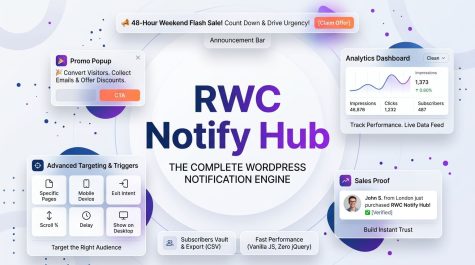
RWC Notify Hub is a WordPress notification engine built to fix low conversions. You can set up promo popups, sticky announcement bars, and live sales proof notifications from a single dashboard. This plugin gives you the exact tools to:
- Announce flash sales.
- Offer discount codes.
- Show real-time purchase notifications to build trust.
- Grow your email list.
This plugin handles your marketing directly inside WordPress. It is the premium version of our free RWC Notify Hub plugin.
10+ Years of WordPress Development
Installing a plugin means trusting it with your site data. Many tools launch and disappear a year later.
Realwebcare has built and supported WordPress solutions for over 10 years. We build products to last.
Buying RWC Notify Hub means getting reliable updates, VIP support, and secure code.
Skip the AI-Generated Code
Website owners sometimes use AI tools to generate code for popups or top bars. They paste the output into theme files. This breaks easily.
- Custom code is hard to maintain. A WordPress core update can break the site.
- Editing colors, text, or display rules requires rewriting PHP and JavaScript.
- Random snippets often lack data sanitization, creating security vulnerabilities.
RWC Notify Hub provides a visual dashboard. You manage everything without touching code.
Frequently Asked Questions
NexNotify
Not at all. Performance is our top priority. The entire frontend runs on optimized Vanilla JavaScript. We do not load heavy external libraries, and we use local browser storage to track views, which means zero extra load on your hosting server.
Every time a visitor submits their email through a NexNotify popup, it is securely saved directly into the Subscribers Vault inside your WordPress dashboard. From there, you can view the list or export it to a CSV file to use with your preferred email marketing software.
Yes. Inside the Display Rules section, you will find a simple checkbox to hide the campaign on mobile devices. This ensures your mobile users have a clean browsing experience while you target desktop users aggressively.
Absolutely zero coding is required. We have built an intuitive, visual settings panel where you can type your text, pick your colors, and set your display rules using simple toggles and dropdowns.
RWC Notify Hub Premium Features
Control your website notifications and lead generation strategy.

Run Popups, Bars & Sales Proof
The Output: Display a promo popup, an announcement bar, and sales proof notifications in one campaign.
Use Case: For a Black Friday sale, show the coupon code in the top bar, collect emails via a popup, and display recent purchases at the bottom.
Pro Tip: Keeping the coupon code visible stops users from leaving your site to search for discounts.

Real-Time Sales Proof PRO
The Output: Show a floating notification of recent purchases, like “John from Dhaka just bought the Premium Plan.”
Use Case: A buyer hesitates on the checkout page. Seeing others buy builds trust and pushes them to complete the order.
Pro Tip: Set a natural delay of 10-15 seconds between notifications. It feels authentic.
Real-Time Live Preview
The Output: See your design changes instantly in a visual preview panel before saving.
Use Case: You are testing hex codes and text sizes. The live preview shows exactly how the popup looks.
Pro Tip: Use the preview to test contrasting button colors against your background.

Global Master Switch
The Output: Turn individual modules on or off with a single header toggle. Inactive modules automatically dim.
Use Case: You want to draft a campaign design without making it live on the site.
Pro Tip: Keep modules toggled off while testing color schemes in the Live Preview.

Pure Vanilla JS Frontend
The Output: The frontend uses Vanilla JavaScript. No jQuery dependencies.
Use Case: Keep your Google PageSpeed scores high. Popups load instantly.
Pro Tip: Fast popups capture impatient buyers. Delay costs sales.

Analytics Dashboard PRO
The Output: View impressions, clicks, and subscriber counts in your admin area.
Use Case: Track how many people click your holiday campaign.
Pro Tip: Monitor your Click-Through Rate. If it drops, test a new headline.

Exit Intent Trigger PRO
The Output: Detects when a user moves to close the tab and displays a popup.
Use Case: A user abandons their cart. The popup offers a free shipping code.
Pro Tip: Pair exit intent with a strong, time-sensitive offer.

Subscribers Vault & Export PRO
The Output: Store collected emails securely in your local WordPress database.
Use Case: Collect emails and export them to a CSV file.
Pro Tip: Import the CSV to your email marketing tool for welcome sequences.
Display Rules
The Output: Target specific posts, categories, or URLs. Hide notifications on mobile devices.
Use Case: Show an e-book download popup only on your blog pages.
Pro Tip: Category-specific offers convert higher than generic site-wide popups.
Live Countdown Timers PRO
The Output: Add a ticking countdown clock to announcement bars.
Use Case: Visually count down the hours for a weekend flash sale.
Pro Tip: Ticking clocks create urgency and force quick decisions.

User Role Management
The Output: Restrict campaign editing to specific WordPress roles.
Use Case: Prevent freelance writers from modifying active marketing popups.
Pro Tip: Limit access strictly to your core marketing team.
1-Click JSON Export & Import PRO
The Output: Download campaign settings as a JSON file and upload them to another site.
Use Case: Build a campaign on a staging site and move it to production in seconds.
Pro Tip: Keep a library of high-converting campaigns saved locally.

Smart Cache Purging
The Output: Automatically clears cache (WP Rocket, LiteSpeed) when you save a campaign.
Use Case: Fix a typo in your popup. The update goes live immediately without manual cache clearing.
Pro Tip: Leave this enabled to guarantee visitors see the latest version.

Google Fonts Integration PRO
The Output: Select typography from the Google Fonts library inside the builder.
Use Case: Match your popup text to your website’s primary brand font.
Pro Tip: Stick to two fonts max. Bold headings, clean body text.

Scroll Depth Trigger PRO
The Output: Trigger the popup after a visitor scrolls a set percentage of the page.
Use Case: Ask for an email only after a reader finishes half of an article.
Pro Tip: Scroll triggers generate higher-quality leads because the user is already engaged.
Optimize Your Campaigns
RWC Notify Hub gives you the tools. You control the strategy.
- Compress background images to WebP format. Heavy files slow down rendering.
- Keep the text short. Visitors spend two seconds reading a popup.
- State the benefit clearly in the headline. “Get 20% Off” works better than “Join our newsletter.”
- Delay the popup. Use a 5-second timer or a scroll trigger so visitors can read your content first.
RWC Notify Hub handles popups, announcement bars, and sales proof. It loads fast, integrates with WordPress, and offers precise targeting.
Get RWC Notify Hub and run your campaigns directly from WordPress.